
Introducing springdoc-openapi-starter-webmvc-redoc: Beautiful API Docs for Spring Boot, Zero Config
If you’ve worked with Spring Boot and OpenAPI, you’ve probably used Swagger UI. It’s the default. It works. But let’s be honest — it looks like it was designed in an era when rounded corners were still exciting.
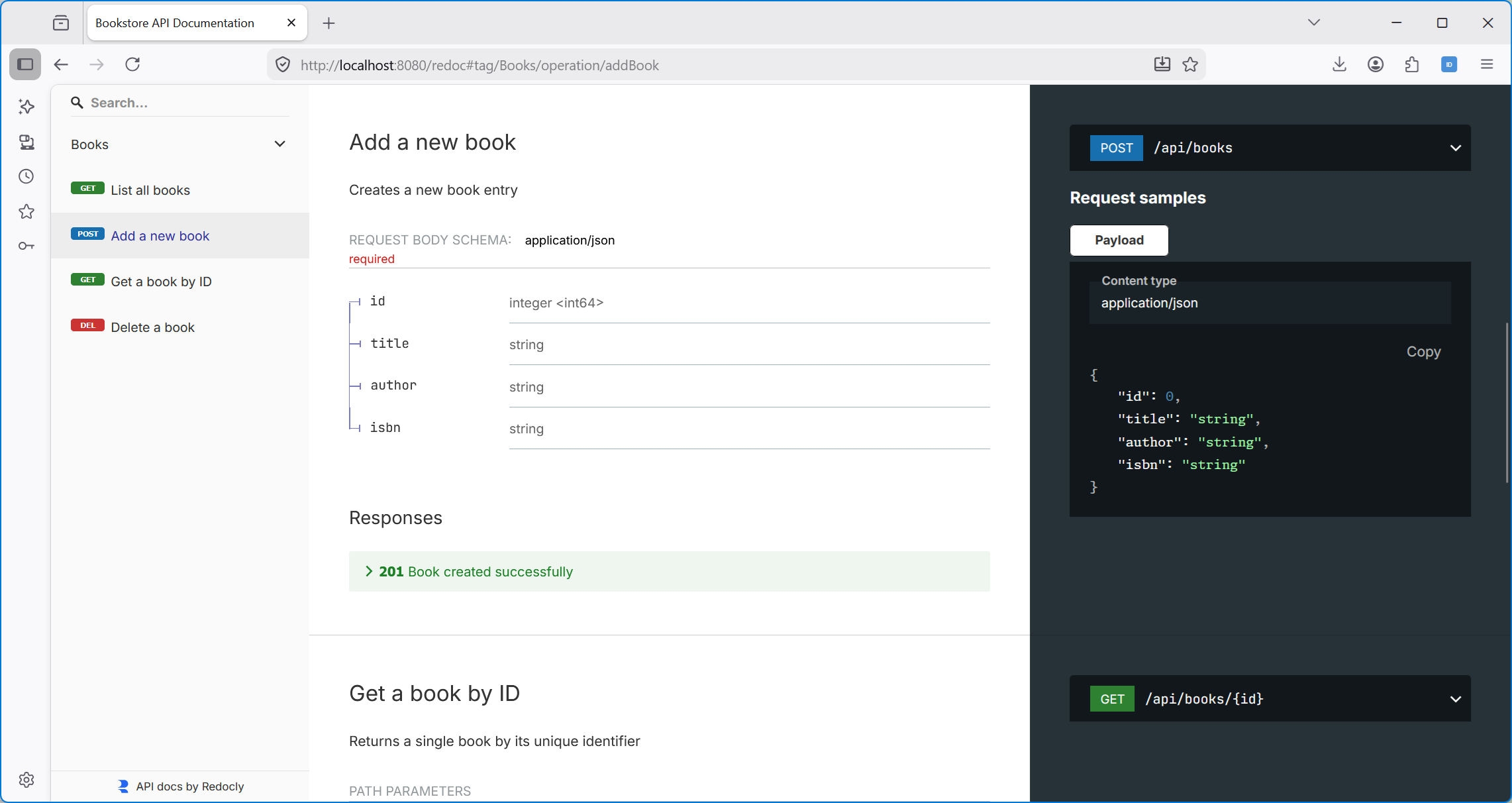
Redoc is the alternative that API teams actually want to show to their consumers. Clean three-panel layout, responsive design, excellent navigation. The problem? Integrating it with Spring Boot has always required manual wiring — downloading JS files, writing HTML templates, configuring resource handlers, and hoping it all holds together when you upgrade Spring Boot.
Today I’m releasing springdoc-openapi-starter-webmvc-redoc — a Spring Boot starter that makes Redoc a first-class citizen in your Spring Boot application.
The Pitch: One Dependency, Done
dependencies {
    implementation 'org.springdoc:springdoc-openapi-starter-webmvc-api:2.8.6'          // your existing OpenAPI dependency
    implementation 'io.github.chandanv89:springdoc-openapi-starter-webmvc-redoc:1.0.0' // that's all you need for Redoc
}
Start your app. Visit /redoc. That’s it!
- No
@Configurationclasses. - No bean definitions.
- No HTML files to maintain.
- No CDN links to worry about.
The starter auto-configures everything following the same patterns Spring Boot developers already know — @ConditionalOnProperty, @ConditionalOnMissingBean, and configuration properties bound via application.yml.
Why Build This?
The springdoc-openapi project provides excellent Swagger UI integration via springdoc-openapi-starter-webmvc-ui. I wanted the same experience for Redoc: add a dependency, get a working UI. Surprisingly, nothing like this existed as a proper Spring Boot starter.
The existing options were either:
- Manual integration — download Redoc JS, create an HTML page, wire up a controller, configure resource handlers. Doable, but tedious and fragile across Spring Boot upgrades.
- Embedded in application code — hard-coded HTML strings in controllers. We’ve all seen (and written) this. Let’s not talk about it.
This starter follows the exact same architecture as springdoc-openapi-starter-webmvc-ui, but for Redoc. If you’ve ever looked at how Swagger UI integration works under the hood in springdoc, this will feel familiar.
What You Get Out of the Box
Modern typography by default. The starter ships with modern fonts like Inter for body text and headings, and JetBrains Mono for code blocks. Because life’s too short for Times New Roman in API docs.
Bundled Redoc JS. The Redoc standalone JavaScript (v2.5.0) is downloaded at build time and bundled into the jar. This means it works in air-gapped environments, behind corporate proxies, and anywhere else where reaching out to a CDN at runtime isn’t an option. If you do want the CDN, there’s a property for that.
Full theme support. Redoc’s theming is powerful — colours, sidebar styling, typography, spacing — and it’s all exposed via application.yml. Want a dark theme? A few lines of YAML:
springdoc:
  redoc:
    theme: >
      {
        "sidebar": {
          "backgroundColor": "#1a1a2e",
          "textColor": "#e0e0e0"
        },
        "colors": {
          "primary": { "main": "#e94560" }
        },
        "rightPanel": {
          "backgroundColor": "#1a1a2e"
        }
      }
All Redoc display options. Search, download buttons, response expansion, scrollbars, JSON sample depth — everything Redoc supports is configurable through Spring Boot properties. No need to touch HTML.
Hidden from your API spec. The Redoc controller is annotated with @Hidden, so it doesn’t pollute your OpenAPI documentation with a /redoc endpoint. Your consumers see your API, not the plumbing.
The Architecture (For the Curious)
Four beans, one auto-configuration class:
RedocAutoConfiguration
├── RedocConfigProperties    — binds springdoc.redoc.*, builds HTML attributes
├── RedocIndexTransformer    — loads HTML template, replaces
├── RedocWelcomeController   — serves rendered HTML at /redoc
└── RedocWebMvcConfigurer    — serves bundled redoc.standalone.js
The HTML template uses simple {{placeholder}} substitution at request time. The transformer reads the template from the classpath, replaces title, spec URL, JS source, font URL, and Redoc options, then returns the rendered page. Straightforward, testable, and easy to override — every bean is registered with @ConditionalOnMissingBean.
WebFlux Support
Yes, there’s a WebFlux module too. Same zero-config experience for reactive applications:
dependencies {
    implementation 'org.springdoc:springdoc-openapi-starter-webflux-api:2.8.6'
    implementation 'io.github.chandanv89:springdoc-openapi-starter-webflux-redoc:1.0.0'
}
Both modules are published to Maven Central from the same multi-module Gradle build.
Publishing to Maven Central: A Journey
Getting the library built was the easy part. Getting it published to Maven Central via Sonatype’s new Central Portal was… an education.
The old OSSRH (oss.sonatype.org) was sunset on June 30, 2025. The new Central Portal is its replacement, and the Gradle publishing story is still catching up. There’s no official Gradle plugin from Sonatype yet — just a compatibility OSSRH Staging API and a growing list of community plugins.
After iterating through a few approaches (raw OSSRH staging API with manual repository promotion via curl, anyone?), I landed on nmcp (GradleUp/nmcp) — a well-maintained community plugin that uses the native Portal Publisher API. It handles both releases and snapshots, supports multi-module aggregation, and Just Works:
// settings.gradle
plugins {
    id 'com.gradleup.nmcp.settings' version '1.4.4'
}

nmcpSettings {
    centralPortal {
        username = System.getenv('OSSRH_USERNAME')
        password = System.getenv('OSSRH_PASSWORD')
        publishingType = 'USER_MANAGED'
    }
}
Releases are published with ./gradlew publishAggregationToCentralPortal, snapshots with ./gradlew publishAggregationToCentralSnapshots. Both are wired into GitHub Actions — snapshot publishing triggers on every branch push, and releases are driven by a manual workflow dispatch that handles semver tagging, building, publishing, and GitHub Release creation in a single job.
If you’re migrating your own Gradle project to the Central Portal, save yourself the staging API rabbit hole and start with nmcp.
CI/CD Pipeline
The project uses three GitHub Actions workflows:
- CI — builds and tests on every push across Java 17 and 21
- Publish Snapshot — publishes
<version>-SNAPSHOTto Central Portal’s snapshot repository on every branch push - Release — manual dispatch that validates semver, builds, publishes to Central Portal, tags the commit, and creates a GitHub Release with attached jars
Versioning is derived from git tags. Locally, ./gradlew build picks up the latest tag and appends -SNAPSHOT. In CI, the VERSION environment variable drives everything. No version hardcoded in build.gradle.
Try It
The project is available on Maven Central. Add the dependency, start your app, visit /redoc.
If you want to explore, the repository includes a demo application with a BookController that showcases CRUD operations with full OpenAPI annotations:
git clone https://github.com/chandanv89/springdoc-openapi-starter-webmvc-redoc.git
cd springdoc-openapi-starter-webmvc-redoc
./gradlew :redoc-example-app:bootRun
Then open http://localhost:8080/redoc.
Source code, issues, and contributions: github.com/chandanv89/springdoc-openapi-starter-webmvc-redoc
Licensed under Apache 2.0. Redoc itself is MIT licensed.
Comments